
POC Reversal [AlgoPrime]
POC · Reversal · Volume Profile
Built by AlgoPrime
What it does
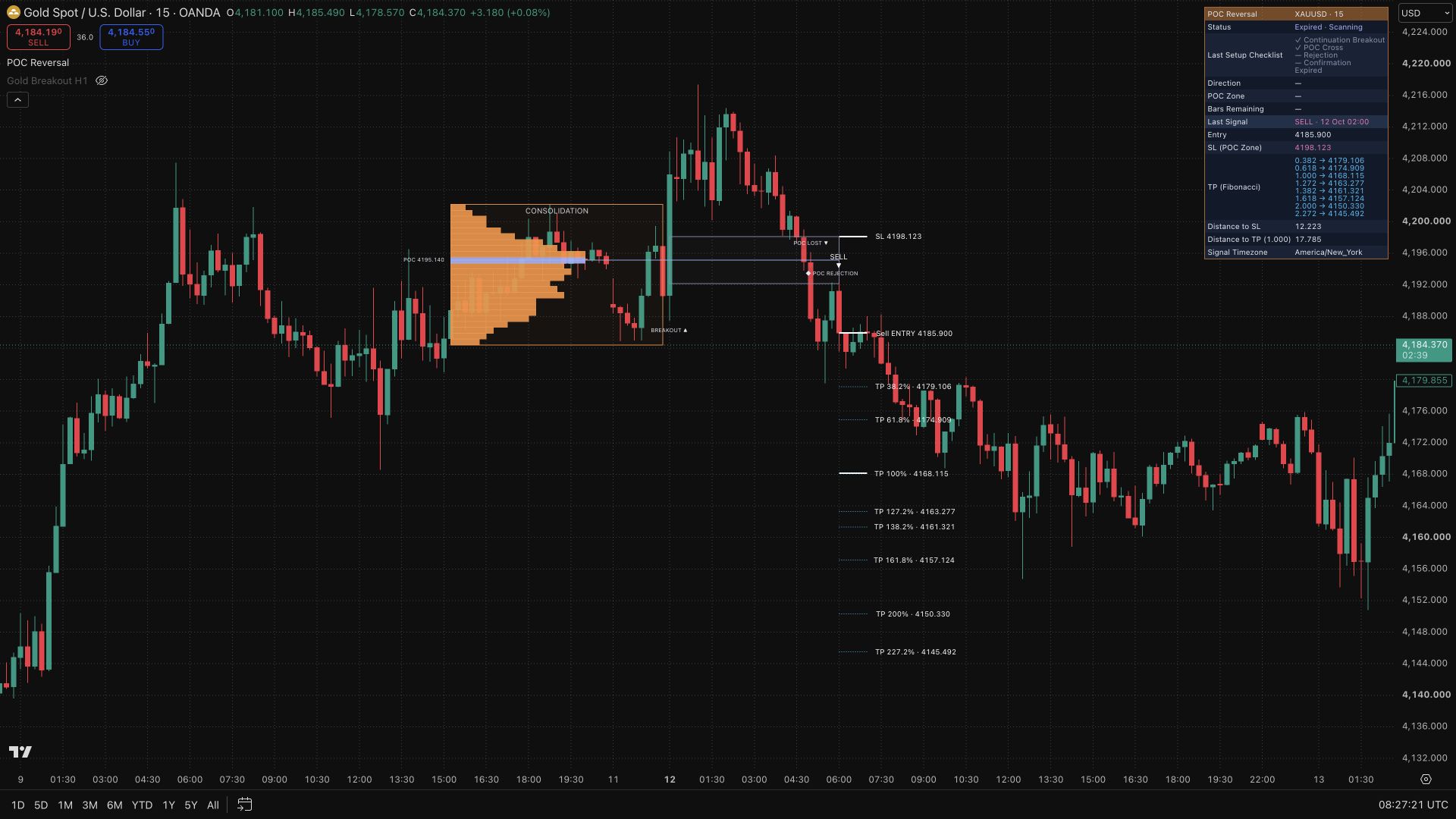
POC Reversal follows what happens when a consolidation breakout loses its original direction. It combines the source range and estimated volume profile with an opposite-direction POC cross, a retest, and rejection confirmation. Labels and a progress dashboard make each stage visible, while entry, stop, and target references help you assess the resulting reversal setup. Gold, BTC, and ETH presets provide a starting point alongside manual controls.
How to Trade with POC Reversal?
Source range: identify the consolidation and original breakout before interpreting any reversal label.
POC cross: watch for price to cross the POC zone against the original direction. This is a setup stage, not the completed reversal entry.
Retest and rejection: follow the return to the zone and subsequent confirmation, then compare the entry with your stop reference and target distance.
Setup status: use the dashboard to check timing and validity. A source setup that already produced a Continuation entry is excluded from Reversal entry generation.
POC Reversal Settings
Preset/Manual: use a preset or configure the setup yourself.
Setup Duration: scale with consolidation length or use separate pullback and confirmation windows.
Stop: reference the POC zone or the consolidation boundary.
Target: Reward/Risk or Fibonacci; 0% starts at entry and 100% equals the source consolidation height.
Display: control expired, cancelled, and historical setups.
Frequently Asked Questions
How does it differ from POC Continuation?
Continuation follows the original breakout direction. Reversal waits for a POC cross and confirmation in the opposite direction.
Is the volume profile based on exchange tick data?
It is estimated from chart-bar data, not an exchange tick-by-tick volume profile.
Are alerts available?
Optional alerts cover the source setup and a confirmed reversal entry. Dynamic Discord-compatible messages require a separately configured TradingView alert and webhook.
How do I access POC Reversal?
Visit the AlgoPrime Pricing page to choose a plan and get access to POC Reversal.
Request TradingView Access
How you get it
- Be on Pro
Choose a plan that includes this tool, or use access from a package you already own.
- Claim it on Pro
Any plan that includes Pro lets you claim it from the Tools Kit at no extra charge.
- Add your TradingView username
Access is granted to your username and the indicator shows up in TradingView under Invite-only scripts.
More like this
All tools
Questions about POC Reversal [AlgoPrime]?
The desk answers in chat — setup, access, or which plan fits.